free · open source · native macOS

Every customer network, one click away.

Drawbridge is a menu bar VPN client for FortiGate SSL-VPN, IPsec IKEv2 and OpenVPN. It keeps your SSH, RDP, VNC, web and file-copy connections next to the VPN they need, and brings the right tunnel up before it opens them.

macOS 15 or later · Developer ID signed & notarized · Apache-2.0

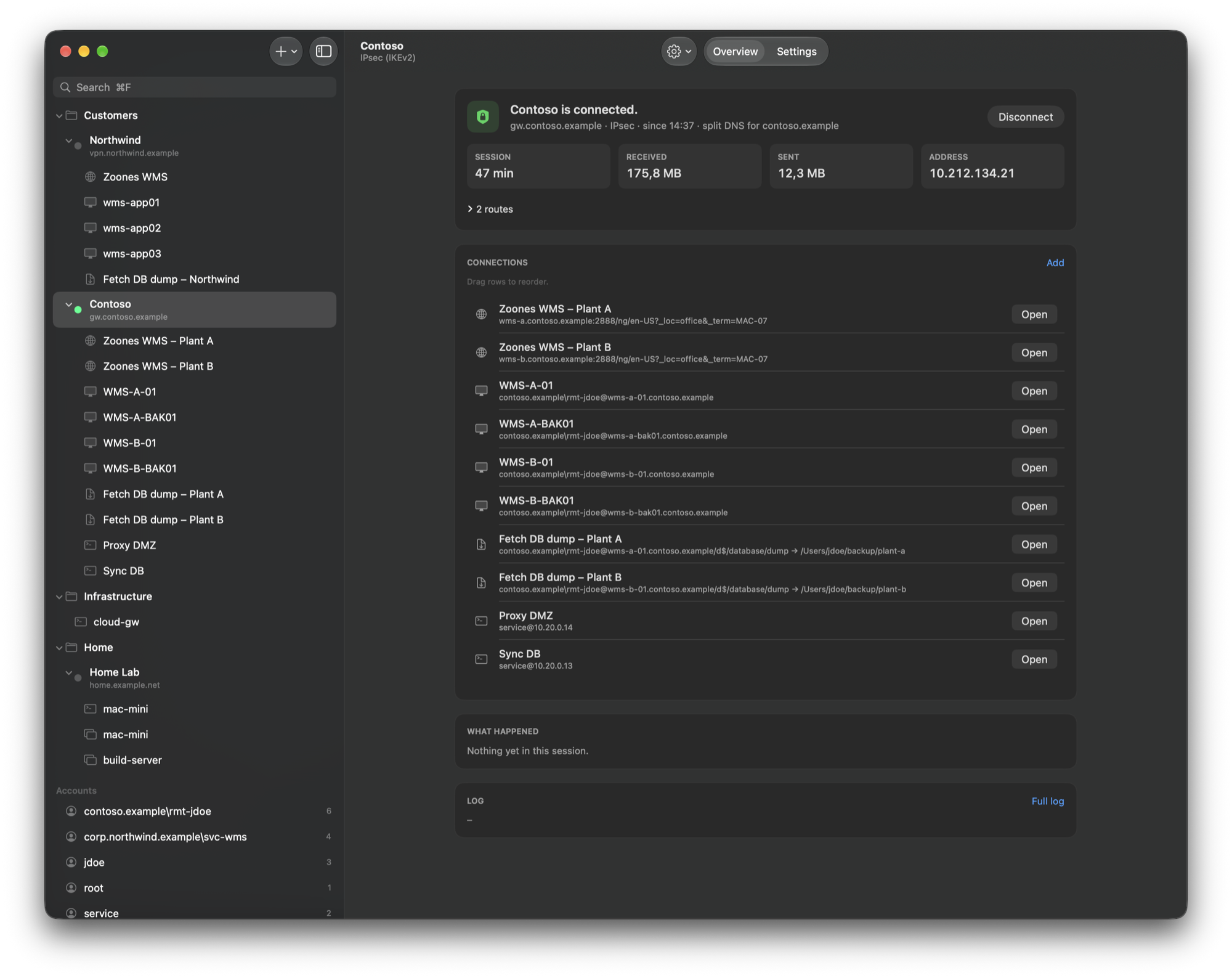
Drawbridge main window: the IPsec VPN “Contoso” is connected, with session time, received and sent data, tunnel address and the list of web, RDP, copy and SSH connections that belong to it. The sidebar groups further VPNs, connections and accounts.
  • FortiGate SSL-VPN
  • IPsec IKEv2
  • OpenVPN
  • SSH
  • RDP
  • VNC
  • Web
  • SMB copy

open "WMS-A-01"

You pick the machine. Drawbridge sorts out the way there.

Every connection knows which VPN it lives behind. Open it from the menu bar or the window and the rest happens in order – each step shown and logged.

  1. Right VPN up

    Its VPN is connected first. If another one is up, Drawbridge asks before it switches.

  2. Tunnel ready

    Routes and split DNS are handed to macOS as one set. Traffic flows only once they are applied.

  3. Host answers

    Drawbridge waits until the host actually answers on its port. No more “connection refused” races.

  4. Client starts

    Your terminal, FreeRDP, Screen Sharing, a browser or rclone – started against the right address.

accounts · rdp · vnc

One account, forty servers, one password change.

Username, domain and password are kept once; connections refer to them. When the domain password changes, you enter it once for every RDP and SMB connection of that account.

  • RDP with FreeRDP, one window per session, tracked by Drawbridge.
  • The password reaches FreeRDP on stdin – not on the command line.
  • Screen sharing via vnc:// in macOS Screen Sharing or another VNC app.
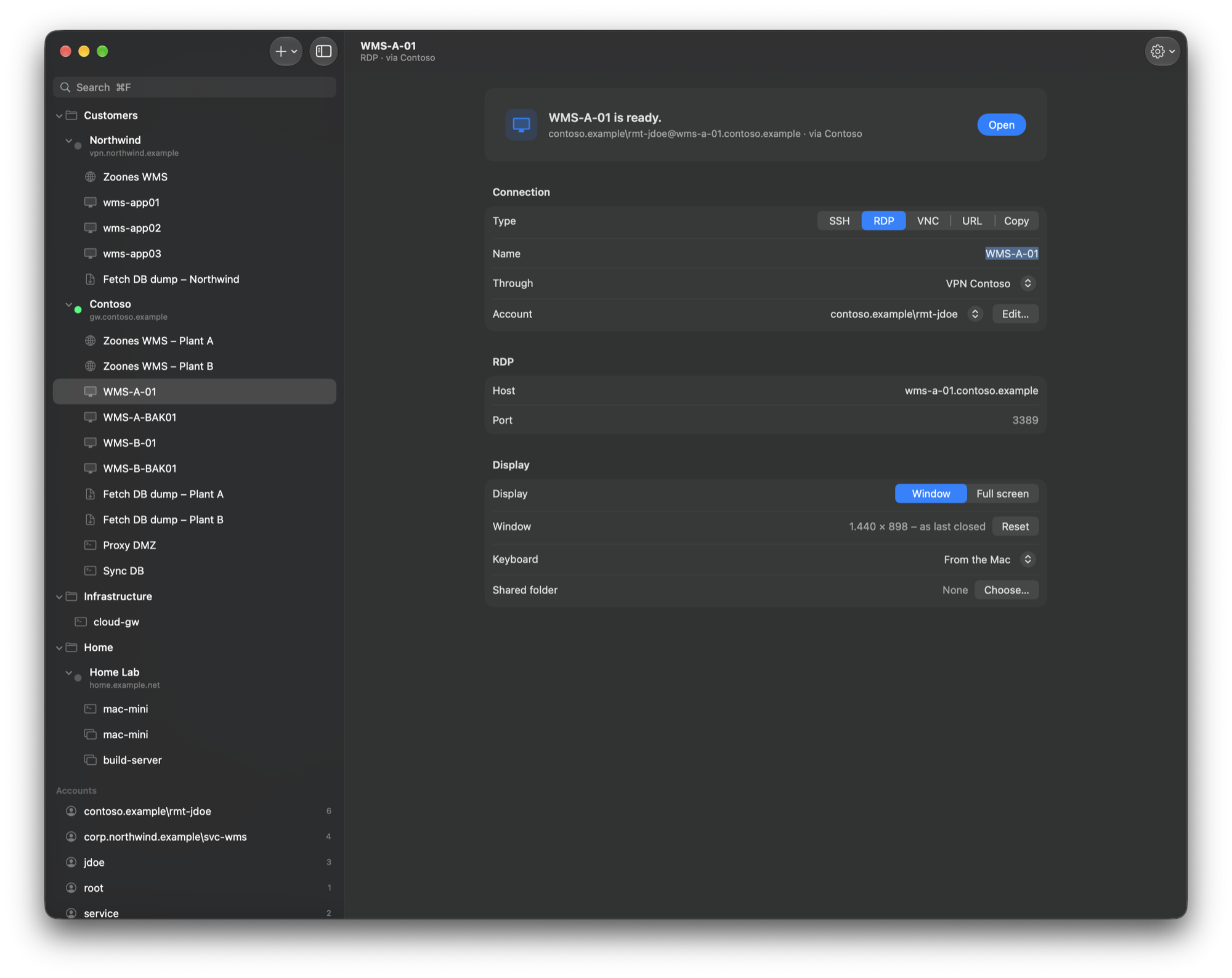
An RDP connection “WMS-A-01” that goes through the VPN “Contoso” and signs in with a shared domain account; display, keyboard and shared-folder options below.
RDP through the VPN, signed in with a shared account

ssh · secretive · forwarding

SSH with keys that never leave the Secure Enclave.

SSH opens in the terminal of your choice and signs in with a key from an SSH agent, for example Secretive with Touch ID. Installing the key runs ssh-copy-id in a terminal: the server password is typed there, never into Drawbridge.

  • Port forwarding: local, remote and SOCKS, listening on localhost only, optionally without a shell.
  • SSH gateways: web, RDP, VNC and copy connections can go through an SSH connection instead of, or behind, a VPN.
  • Imported profiles never bring remote forwardings along.
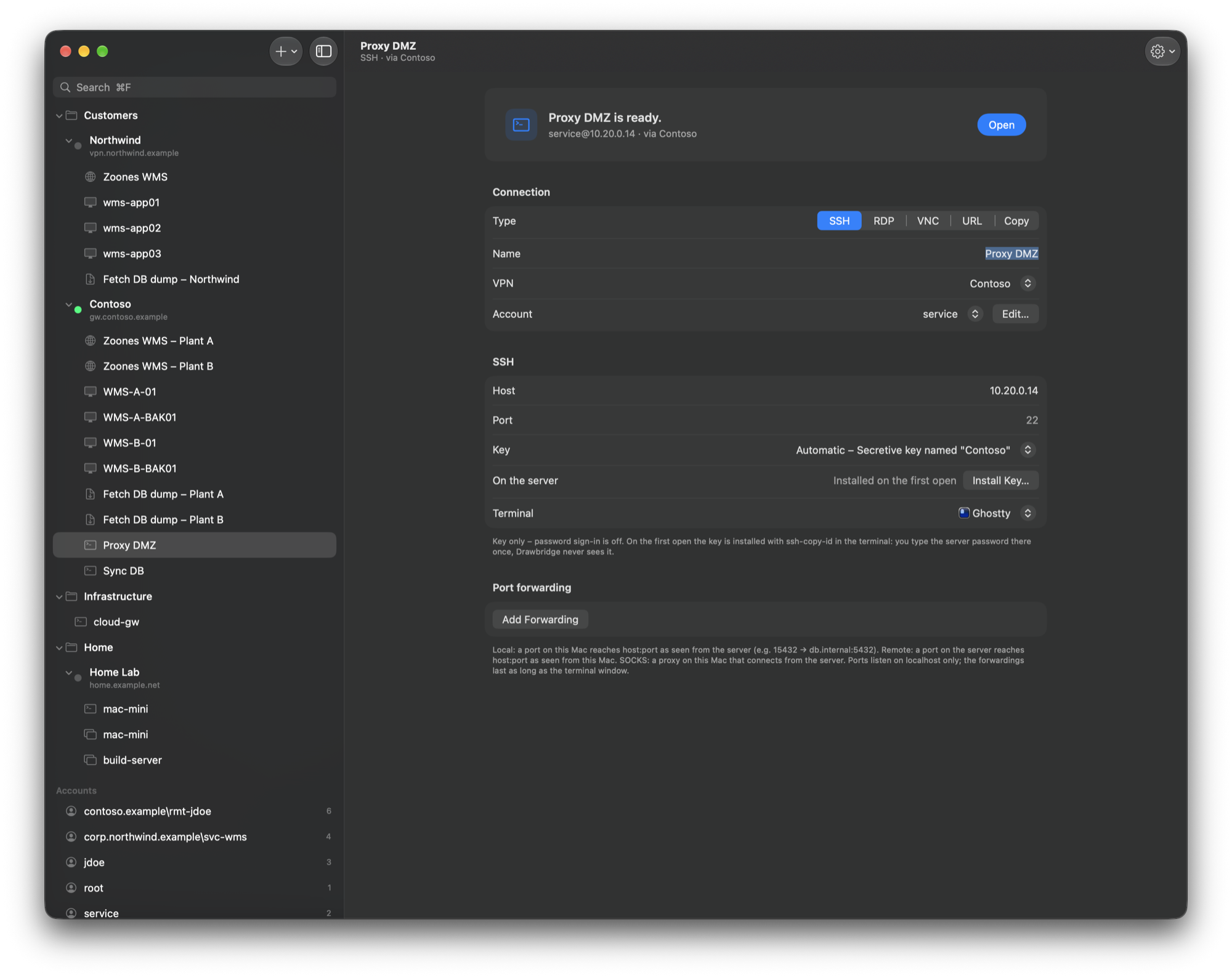
An SSH connection “Proxy DMZ” via the VPN “Contoso”: key set to a Secretive key, key installation on the server, terminal choice and a port forwarding section.
SSH with a Secretive key and port forwarding

web · variables

Share the profile set. Keep the per-user bits out of it.

Web pages open in the default browser or one chosen per connection. Hosts, URLs, shares and folders take variables, so the whole team imports the same connections and everyone still lands on their own terminal id.

  • ${var.NAME} defined in the app, ${env.NAME} from the environment.
  • ${mac.name}, ${mac.user} and ${mac.home} from this Mac.
  • Exports carry only the variable names – and never usernames or passwords.
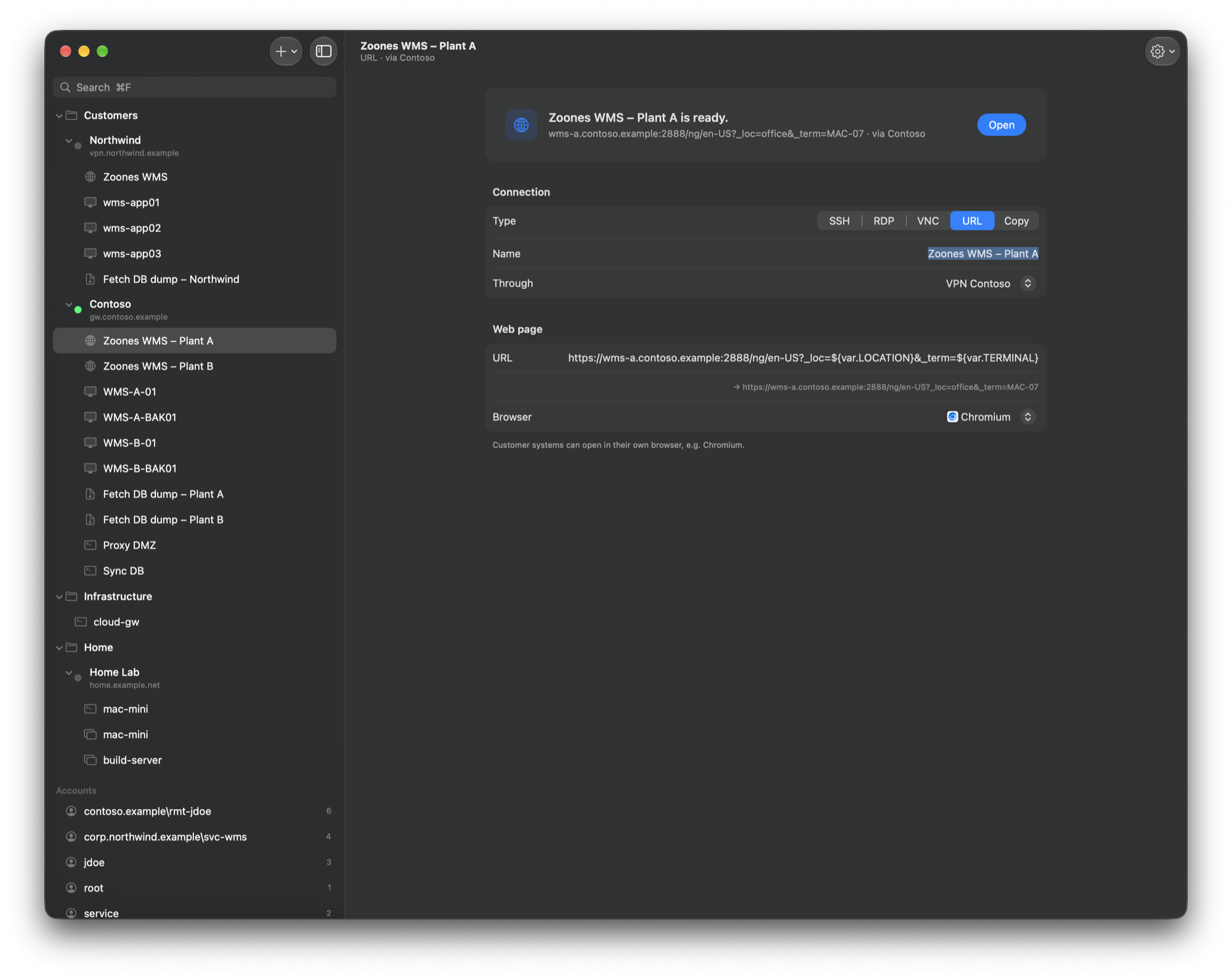
A web connection “Zoones WMS – Plant A” through the VPN “Contoso”; its URL contains the variables var.LOCATION and var.TERMINAL, with the resolved address shown below and Chromium chosen as browser.
A web connection with variables in the URL

copy · smb · rclone

Fetch last night's dump without mounting anything.

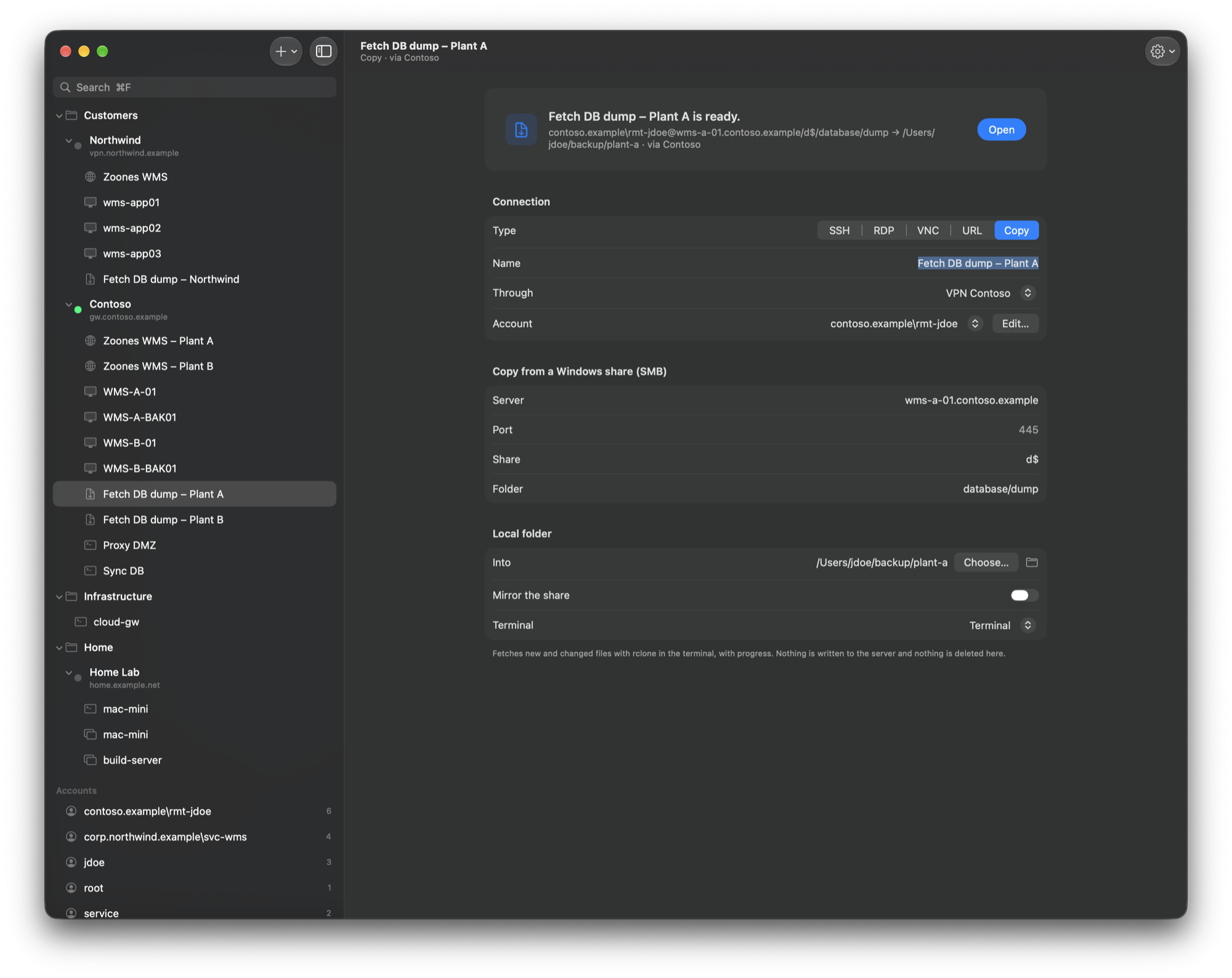
A copy connection pulls a folder from a Windows share into a local folder with rclone, in the terminal, with progress. New and changed files only.

  • Read-only by default: nothing is written to the server, nothing is deleted locally.
  • Mirror is opt-in, and only into a folder of its own – never the home folder or a disk.
  • The password reaches rclone through a one-shot named pipe – not on the command line or on disk.
A copy connection “Fetch DB dump – Plant A”: server, share and folder on a Windows share, the local target folder, the “Mirror the share” switch turned off and the terminal to run in.
Fetch a folder from a Windows share

three tunnels, zero vendor clients

The protocols, implemented from the ground up in Swift.

No pppd, no openfortivpn, no OpenVPN binary. The tunnels run in a sandboxed Network Extension and terminate directly on a utun interface.

SSL-VPN

FortiGate · PPP over TLS
  • Username and password, one-time tokens (typed or push) or SAML single sign-on – in a built-in window or the default browser.
  • Okta helpers: optional auto-fill that is never retried into a lockout, and the Okta Verify number challenge as a badge and notification.
  • Untrusted gateway certificates can be pinned per profile after you confirm the fingerprint.

IPsec IKEv2

FortiGate · PSK + EAP-TTLS + token
  • Pre-shared key for the gateway, EAP-TTLS (PAP) for the user, plus the token step as second factor.
  • The EAP-TTLS server certificate is pinned on the first successful connect. Credentials never go to a different one.
  • AES-GCM, ECP groups 19/20, NAT traversal, userspace ESP over UDP 4500, dead-peer detection, CHILD_SA rekeying with PFS.

OpenVPN

.ovpn import · own implementation
  • Import a .ovpn file; certificate, private key and tls-auth key go into the keychain.
  • TCP transport, tls-auth, TLS 1.2/1.3; data channel AES-GCM, AES-CBC + HMAC or ChaCha20-Poly1305.
  • Profiles with server checks Drawbridge can't enforce are refused, not silently weakened.

Split tunnel, split DNS

Split or full tunnel routes and split DNS. macOS removes them again on disconnect.

Kill switch

Optional per profile: blocks traffic outside the VPN while it connects, reconnects or has dropped. The local network stays reachable.

One-time codes

macOS suggests codes from Messages and Mail right in the code field.

Menu bar first

Lives in the menu bar; Dock icon and launch at login are optional.

cat /proc/trust

Built the way you would want a VPN client built.

You are about to hand it the keys to other people's networks. So here is what it does with them.

secrets
Only in the Keychain. Passwords and pre-shared keys live in the data-protection keychain of the app group. Profile export and import (JSON) carries no secrets and no usernames.
privileges
No root helper. The tunnel runs as a sandboxed Network Extension; macOS creates the interface and applies routes and DNS for it.
leaks
While all traffic goes through the VPN, IPv6 is blocked, so it can't bypass the IPv4 tunnel on dual-stack networks.
identity
Interoperable, not impersonating. Drawbridge speaks the gateways' standard protocols and sends no vendor IDs or client-identity data.
telemetry
None. The only call home is the update check against GitLab, at launch and once a day – and you can switch that off.
updates
Installed from within the app, on request. The download must match the release's SHA-256, be signed by the same Developer ID team and be notarized.

source
Swift, Apache-2.0, protocol core unit tested. Read it, build it, break it.

install

Three steps, no installer.

  1. Download the DMG and drag Drawbridge into Applications. The extension only activates from there.
  2. Allow the network extension on first start: System Settings ▸ General ▸ Login Items & Extensions ▸ Network Extensions.
  3. Allow the VPN configuration on the first connect. Your VPNs also appear under System Settings ▸ VPN.

macOS 15 or later · Developer ID signed & notarized

# RDP connections use FreeRDP
$ brew install freerdp

# copy connections use rclone
$ brew install rclone

Honest status: an early version, in daily use against FortiGate SSL-VPN (SAML/Okta) and IKEv2 (PSK + EAP-TTLS + token). The tunnels carry IPv4 only; IKE SA rekeying, IKE over TCP, IKEv1, DTLS and client certificates for IKEv2 are not there yet. The full list is in TODO.md.

Drawbridge app icon: a castle gate with a lowered drawbridge and a padlock

Lower the drawbridge.

macOS 15 or later · Developer ID signed & notarized · free, Apache-2.0